Install Debian on Milk-V Duo 256M
The Milk-V Duo 256M is a compact and affordable single-board computer (SBC) designed for embedded applications, IoT projects, and hobbyist use. Powered by the Sophon SG2002 SoC with a dual-core RISC-V CPU, this guide shows you how to install Debian and configure SSH access over Ethernet.
Steps
- Download and Flash the Image
Download the image from the sophgo-sg200x-debian and flash it to a microSD card using Rufus. - Connect via USB
Connect the board to your computer via USB and open a terminal:ssh debian@10.42.0.1 # Default password: rv - Enable DHCP on the Ethernet Port
First, check the network status:nmcli device status DEVICE TYPE STATE CONNECTION end0 ethernet connected Wired connection 1 lo loopback connected (externally) lo usb0 ethernet unmanaged -- tunl0 iptunnel unmanaged --
Then, modify the connection to use DHCP:sudo nmcli connection modify "Wired connection 1" ipv4.method auto - Connect via Ethernet
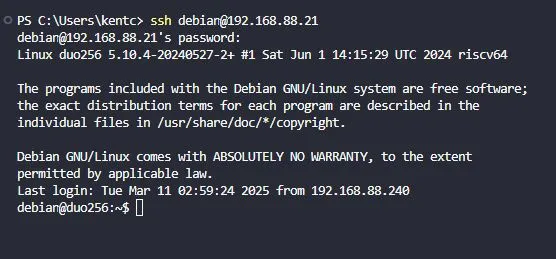
Plug in the Ethernet cable and restart the board. Check your router for the board's IP address, then SSH into the board:ssh debian@192.168.88.21 # Default password: rv - Update the System
With internet access, run the following commands to update your system:sudo apt update sudo apt upgrade - Verify the Configuration
Use a tool likescreenfetchto display system information:screenfetch _,met$$$$$gg. debian@duo256 ,g$$$$$$$$$$$$$$$P. OS: Debian ,g$$P"" """Y$$.". Kernel: riscv64 Linux 5.10.4-20240527-2+ ,$$P' `$$$. Uptime: 1h 7m ',$$P ,ggs. `$$b: Packages: 581 `d$$' ,$P"' . $$$ Shell: bash 5.2.37 $$P d$' , $$P Disk: 3.2G / 120G (3%) $$: $$. - ,d$$' CPU: Unknown $$\; Y$b._ _,d$P' RAM: 71MiB / 235MiB Y$$. `.`"Y$$$$P"' `$$b "-.__ `Y$$ `Y$$. `$$b. `Y$$b. `"Y$b._ `""""